Two Levels
This is where I had a moment of clarity. What I really wanted.

And it wasn’t 6 files (3 .bat files and their 3 corresponding .properties files).
It was a single file that I could schedule and then never worry about disaster recovery again… …you know, except if disaster were to strike… …and obviously a bi-annual disaster recovery exercise because you don’t want your first time testing your disaster recovery option to be when you actually have to use it to continue business operations.
I needed something like, a command line interface. Where I could state an option within the scheduled task and call it a day.
It ended up looking like this:
#on a weekly task
WebGISDR-cli-wrapper.py -full 4
#on a daily task
WebGISDR-cli-wrapper.py -incremental 4With these extra options, I set the type of backup and the number of copies to retain as well.
And if you’re like me, the question you’re probably asking is, but how? And fortunately, that’s pretty easy to answer. I wrote a CLI wrapper in Python in about a hundred lines that really boils down to 3 functions:
prune_copies()- take a directory, search for the.webgissitefiles that match the selected backup mode, and keep only the number that you want to have on hand at a given time. This results in dropping a file every time before you run the WebGIS DR tool again.set_WebGISDR()- open thewebgis.propertiesfile, change the parameterBACKUP_RESTORE_MODEparameter to match the user inputrun_WebGISDR()- runs the original WebGIS DR CLI like it would normally run:webgisdr --export --file webgisdr.properties
We’ll go ahead and look at it in a logical sequence:
This is the flow of the CLI. We take some arguments, feed those to our main function, and then distribute those to the three primary functions as needed.
def main(backup_arguments: argparse.Namespace):
    print(
        f"\tbackup_mode is: {backup_arguments.mode}\n\tcopies to retain: {backup_arguments.copies}\n"
    )
    prune_copies(WebGISDR_backups_path, backup_arguments)
    set_WebGISDR(WebGISDR_dir, WebGISDR_filename, backup_arguments.mode)
    run_WebGISDR(WebGISDR_dir, WebGISDR_filename)

if __name__ == "__main__":
    arguments = configure()
    main(arguments)
For us to ask our user to input options at runtime, we have to do some prep-work in this configure function. This was my first time using the argparse library and it was fairly painless. Looking forward to doing more with it if I need to set runtime arguments again. There’s really not a reason to ask for more from the user other than what kind of backup or the number of copies that they want to retain. There are definitely more complicated backup copy management strategies but for 80% of use-cases this is likely satisfactory.
def configure():
    """Configures the user input arguments

    Returns:
        argparse.Namespace
    """
    parser = argparse.ArgumentParser()
    parser.add_argument(
        "mode",
        choices=["FULL", "INCREMENTAL", "BACKUP"],
        type=str.upper,
        help="""the type of WebGISDR backup to be performed: backup, full, or
        incremental. this input is case insensitive.
        """,
    )
    parser.add_argument(
        "copies",
        choices=range(1, 8),
        type=int,
        help="""
        the number of copies to retain. this is the number of backups
        only for the backup mode input/selected. this is exclusive of the primary backup
        which will run at the end of the script.
        """,
    )
    print(f"{spacer}\n{spacer}\nRunning WebGISDR Automation")
    return parser.parse_args()
And for a bit of context, here’s what that would look like if you ran the –help flag.
the WebGISDR Automation CLI Wrapper’s help menu
Running WebGISDR Automation
usage: WebGISDR-cli-wrapper.py [-h] {FULL,INCREMENTAL,BACKUP} {1,2,3,4,5,6,7}

positional arguments:
  {FULL,INCREMENTAL,BACKUP}
                        the type of WebGISDR backup to be performed: backup, full, or incremental. this input is case insensitive.
  {1,2,3,4,5,6,7}       the number of copies to retain. this is the number of backups only for the backup mode input/selected. this is exclusive of the
                        primary backup which will run at the end of the script.

options:
  -h, --help            show this help message and exit
Moving on, we can look at the imports and constant variables. For most use-cases, the only thing that should need to be filled out is the WebGISDR_backups_path variable. Which, should live in a machine that isn’t the Portal component. Because. Disaster.
You’ll also notice that the import statements are fairly light. This is designed to utilize components of the standard library in Python so that a minimal environment can be set up on the Portal machine. Also pathlib is just an elegant library. When I first learned Python all the file management stuff was handled using the os library, I’ve found that pathlib much easier to handle and it is more readable as well.
import statements and constant variables
import argparse
import os
import subprocess
from pathlib import Path

# Variables
WebGISDR_filename = "webgisdr"
WebGISDR_dir = Path(r"C:\Program Files\ArcGIS\Portal\tools\webgisdr")
WebGISDR_backups_path = Path(r"\\some-filepath-here")
spacer = "-" * 50
Finally we’re at the primary three functions. Here’s prune_copies().
- We create a list of paths from the directory indicated by the constant
WebGISDR_backups_path, where the backup matches our user input (using dot notation from our argument names that we defined in the configure function). All backup copies look like:yyyymmdd-hhmmss-TYPE.webgissitewith this in mind, we can run a wildcard (*) string search to grab anything that matches ourTYPE - Sort the list in descending order, this means that oldest copies are at the end
- Create another list through a list comprehension so that we can have a pretty output that only includes file names
- Create a list of backups to be retained by slicing the sorted list according to our user input
- Create a list of backups to be pruned by slicing from the other direction
- Iterate through our prune list and use
pathlib’s.unlink()to remove those from the file system
def prune_copies(webgisdr_backups_path: Path, backup_arguments: argparse.Namespace):
    """Prunes a list of files according to the number of copies.

    Args:
        webgisdr_backups_path (Path): a directory path to the .webgissite backups
        backup_arguments (argparse.Namespace): the user input arguments for backup and copies
    """
    print(f"Pruning backups")
    WebGISDR_backups = list(
        webgisdr_backups_path.glob(f"*{backup_arguments.mode}.webgissite")
    )
    WebGISDR_backups.sort(reverse=True)
    file_names = [file.name for file in WebGISDR_backups]
    backups_retained = file_names[: backup_arguments.copies]
    backups_pruned = file_names[backup_arguments.copies :]
    for file in backups_pruned:
        Path(webgisdr_backups_path, file).unlink()
    print(f"\tretained:\t{backups_retained}\n\tpruned:\t\t{backups_pruned}\n")
    return
Next we’re setting the parameter of the webgisdr.properties file to match the user input type in the appropriately named set_WebGISDR() function.
- We create a
Pathto the file - Read in the file as a
string - Create a list of strings where each item is a new line
- Iterate through the lines and find the line with the parameter
BACKUP_RESTORE_MODE. Replace this list item with a string that utilizes our user input - Write the list of strings as string using a new line joiner
def set_WebGISDR(webgisdr_dir: Path, webgisdr_filename: str, backup_mode: str):
    """Sets the WebGISDR configuration file's BACKUP_RESTORE_MODE property

    Args:
        webgisdr_dir (Path): the webgisdr tools directory path on the arcgisportal machine
        webgisdr_filename (str): the name of your webgisdr configuration file, it is normally 'webgisdr'
        backup_mode (str): the backup mode that was input as an argument
    """
    print(f"Setting {webgisdr_filename}.properties: BACKUP_RESTORE_MODE")
    WebGISDR_properties = Path(webgisdr_dir, f"{webgisdr_filename}.properties")
    file_content = WebGISDR_properties.read_text()
    lines = file_content.splitlines()
    for i, line in enumerate(lines):
        if "BACKUP_RESTORE_MODE =" in line:
            print(f"\tcurrent value:\t{line.split(' = ')[-1]}")
            lines[i] = f"BACKUP_RESTORE_MODE = {backup_mode}"
    WebGISDR_properties.write_text("\n".join(lines
Lastly, we just need to run the standard WebGIS DR tool in the function run_WebGISDR().
- Change directory to the WebGISDR tool within the Portal installation
- Craft a string that will be used in the
subprocess.run()function, this is analagous to opening a command prompt terminal - Run the
webgisdrcommand
Python code describing the run_WebGISDR() function:
def run_WebGISDR(webgisdr_dir: Path, webgisdr_filename: str):
    """Runs the WebGISDR command-line utility

    Args:
        webgisdr_dir (Path): the webgisdr tools directory path on the arcgisportal machine
        webgisdr_filename (str): the name of your webgisdr configuration file, it is normally 'webgisdr'
    """
    print(
        f"Changing Directory to {webgisdr_dir}\n\trunning standard WebGISDR utility now\n\n{spacer}\n{spacer}"
    )
    os.chdir(webgisdr_dir)
    cmd_webgisdr = f"webgisdr --export --file {webgisdr_filename}.properties"
    subprocess.run(cmd_webgisdr, shell=True)
    print(f"{spacer}\n{spacer}\nAll Operations Complete\n{spacer}\n{spacer}")
    return
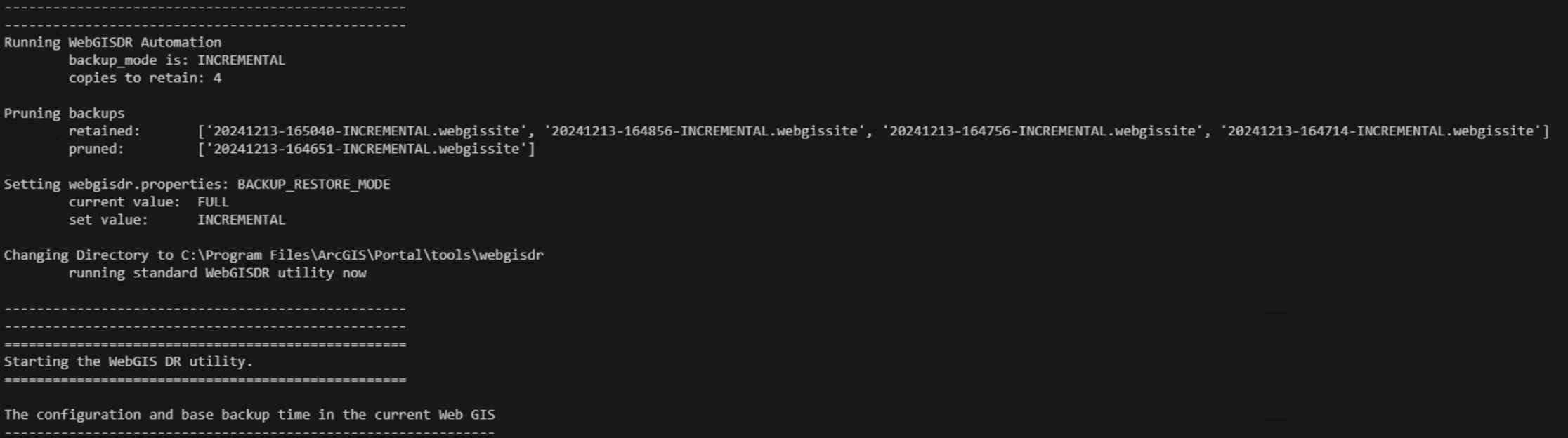
And that’s it. A fairly painless automation for setting and forgetting an out-of-the-box disaster recovery solution. When it runs it looks like this:
If you’d like to use it in your own deployment you can find it on my GitHub here: https://github.com/FeralCatColonist/Spatial-Grimoire/blob/main/WebGISDR-cli-wrapper.py