For me, when I’m writing something I like to have the different portions/objectives laid out so that I make sure I’m thinking about everything that I need to. This also helps me to size out my steps because I like to be able to look at everything at a glance. For this project, the goal was as follows, create a unique Asset Identifier like the following:
DRS_JC_20241223_001
Where we meet the following criteria:
- the initial section is the feature class prefix
- the second section is the initials of the user
- the third section is an 8-digit date like
YYYMMDD - the fourth section is an incrementing number of the features collected that match: the current user, the current date, then add one (1)
When we lay it out like this, the code is fairly unassuming; if we used a template literal, it would look kinda like:
`${prefix}_${user_initials}_${todaysdate}_${some_increment}`So now we get to ask ourselves, how would we go about getting each of these pieces of information? And might there be some hidden pieces of logic we’re forgetting about?
Prefix
This is more manual than I would actually prefer. I would love to simply ask the feature class what its name is and dynamically enter it but there is not yet any functionality for that. Since we’re using this from the Field Maps Designer we, as the author, know what feature class we’re working with.
var fc_prefix = "DRS"So we’ll enter this manually, that’s okay I guess
User Initials
Creating this variable is most definitely dependent on how your users are entered into your ArcGIS Online organization or Enterprise Portal. The assumption is that you have some derivation of: firstname.lastname
Standardization is great. And sometimes you have to take an opportunity to implement it, like an automation for an AssetID.
I digress. Okay, we’re looking for initials, if I were working in Python I’d just do some string slicing here. In Arcade slicing is for arrays, so for text/string we work with syntax like Left, Mid, or Right.
var first_initial = LEFT("firstname.lastname", 1)In order to isolate the last name, we’ll use the Split function on a known identifier, which would be the full stop “.”
Split returns the text as an array, so we’ll select the second index position [1].
var split_names = SPLIT("firstname.lastname") // ["firstname", "lastname"]
var last_name = split_names[1] // "lastname"
var last_initial = LEFT(last_name, 1) // "l"
Arcade can be kind of wordy if you let it be. You can combine all of those steps but eventually readability becomes an issue.
var last_initial = Left(Split("firstname.lastname")[1],1)While one-liners work, sometimes they are a pain to maintain. We can keep it as a single variable and add some more legible structure to it.
var last_initial = Left(
    Split("firstname.lastname")[1]
    ,1)
And yeah, we totally got ahead of ourselves. How do we even get the username programmatically? With a Portal function, GetUser. It’s super neat and you can use it to do permissions management. Anyway, it returns a dictionary with the following values:
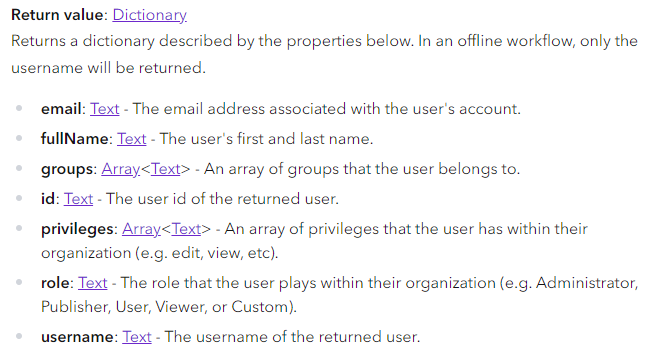
Our goal is to be able to do some things offline, so we are dependent on the username attribute only. As dictionary values, these can be accessed with dot-notation. The portal object is the current layer we’re working with which we can use the $layer global variable. But it could be any kind of Portal object if you know the itemID or its name.
var user_name = GetUser($layer).username // "firstname.lastname"Now that we have a method for getting the username we can put it all together like:
var user_name = GetUser($layer).username
var user_initials = Upper(
    Left(user_name, 1) +
    Left((Split(user_name, ".")[1]), 1)
)
I added an UPPER to keep the initials looking tidy
8-Digit Date
Thanks to some convenience functions this one is fairly simple. We can use Today to grab today’s date. That will return a date object, we want to format it, so we’ll head over to the text functions for that piece.
Text will take any value and convert it into a text value, it has an optional format parameter that we’ll use to specify how we want our date to be outputted; the eight-digit pattern looks like: “YMMDD”
var date_eight_digits = Text(Today(), "YMMDD")This is definitely less confusing than in Python
Incrementing Number of Features
At previous organizations, I’ve done some fancy things with AssetIDs. And by fancy, I mean dumb. And by dumb, I mean, over-engineered based on spatial positioning for a grid system that was subject to change. I really like the pattern our staff came up with, it bakes in a create date, who collected it, and then doesn’t artificially constrain the total number of assets– –just assumes a person doesn’t collect more than 999 assets in a day. How does one increment features though? Through featuresets of course! But before we get to featuresets, it’s helpful to thing about how we’d do this on the desktop.
Filter
We would Filter our feature class using a definition query. Arcade utilizes the SQL-92 standard, which is the same used by shapefiles and file geodatabases. Some light reading can be found here:
SQL reference for query expressions used in ArcGIS—ArcGIS Pro | Documentation https://doc.esri.com/en/arcgis-pro/latest/help/mapping/navigation/sql-reference-for-elements-used-in-query-expressions.html
Again, pretending we’re just writing a definition query on the desktop, because we would know what field we’re searching, the AssetID, we’d know what feature class we were in “DRS”, we would know what worker we’re looking for “JC”, and we’d know today’s date “20241227”. What we wouldn’t necessarily know, is how many records we were expecting to find, so we’d use the modulo “%” as a wildcard. We’d write something like:
AssetID LIKE 'DRS_JC_20241227_%'In our work so far, we’ve already created all of these pieces of information as variables. Our SQL Query looks like this:
var sql_query = `AssetID LIKE '${prefix}_${user_initials}_${date_eight_digits}_%'`This looks suspiciously like what we already saw at the top of the article. Where does FILTER come in? With featuresets. Featuresets deserve their own article to be honest. We’ll do our best to gloss over it. Your $layer is a featureset. End gloss. So if we have a featureset, we can then filter it with a standard SQL-92 query. This returns a smaller featureset of features that match our filter.
var current_features = Filter($layer, sql_query)Count Number of Features
Now that we know how many features match our formula, let’s count how many there are and then one (1) to that. This is made simple with Count, it returns a number, for our featureset it could be any integer from zero (0) upwards. In our example, we’ll just add one (1) to it.
var feature_count = Count(current_features) + 1A problem that we’ll run into though, is this number isn’t padded. If we keep it as-is, then our Asset IDs will end up looking like this:
DRS_JC_20241223_1
DRS_JC_20241223_10
DRS_JC_20241223_100
...
DRS_JC_20241223_9
DRS_JC_20241223_99
DRS_JC_20241223_999
Since they’re a text column they won’t sort right. Everyone will hate it. We’ll again turn back to the ever-useful Text to format this appropriately:
var feature_count = Text(Count(current_features) + 1, '000')Calculate AssetID
We’re going to wrap this all together as a function to keep it tidy. And also, because there’s a gotcha coming up ahead. There are all sorts of things we could discuss about functions but we’re going to also gloss over it. For right now, it’s enough to say, you have to create a function first before you can use it. Our function takes some parameters, calculates the things from above, and returns a string that matches our incrementing asset ID pattern.
function Calculate_Asset_ID(fp_prefix, fp_user_initials, fp_date_eight_digits) {
    var sql_query = `AssetID LIKE '${fp_prefix}_${fp_user_initials}_${fp_date_eight_digits}_%'`
    var current_features = Filter($layer, sql_query)
    var feature_count = Text(Count(current_features) + 1, '000')
    return `${fp_prefix}_${fp_user_initials}_${fp_date_eight_digits}_${feature_count}`
}
nice and tidy